Import Unreal T3d into Blitz3d
Blitz3D Forums/Blitz3D Programming/Import Unreal T3d into Blitz3d
| ||
Yes i finally did it. Not completely perfect yet, this was just a quick room i made in unrealed 2.0. Exported the entire map as a brush and then wrote an importer for t3d format. Currently this is in b3dsdk as an addon for one of my programs but i'll write a regular blitz3d one you should be able to copypasta.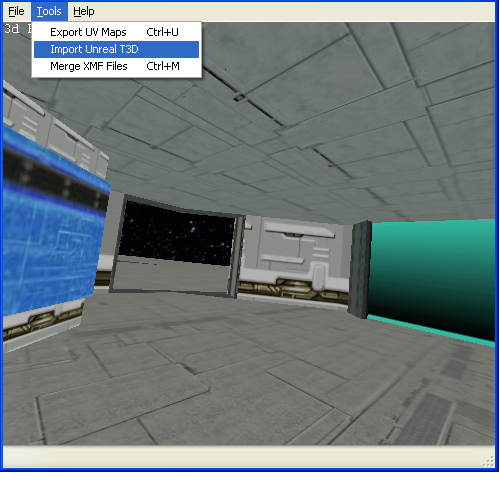 |
| ||
Ok got all the other texture coordinate issues fixed :D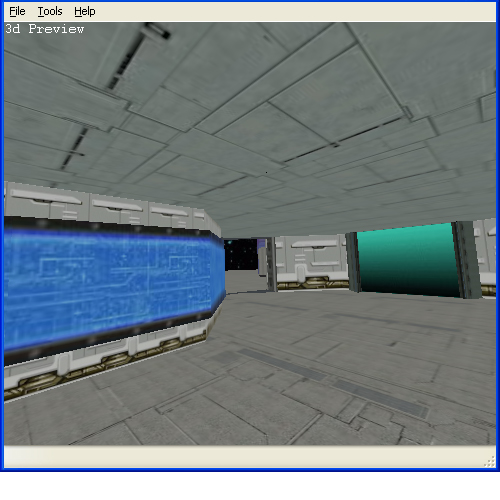 |
| ||
| This sounds fantastic. While I don't currently create this kind of game, the idea of using either the various free maps out there or creating my own with unrealEd may change my mind. You'll have to put up a demo with a substantial map we can wander around in! Questions: - Is there a way to get UnrealEd without buying Unreal? - Will it eventually support UnrealEd 3.0? - Does it convert to .B3D file or just import as a mesh? Thanks! |
| ||
| - Is there a way to get UnrealEd without buying Unreal? No but unreal GOTY is like maybe $10 lol thats aiming high. you could probably torrent it i doubt epic would care much about that game at this point. - Will it eventually support UnrealEd 3.0? Should, T3d format is mostly the same except i would have to use Quats instead of Eulers - Does it convert to .B3D file or just import as a mesh? This particular tool i made which you can actually grab here http://www.vigilsoft.net/2010/07/31/xmf-recovery-tool/ exports the map to 3ds format, but i can easily set it to export to b3d. |
| ||
| Alright i converted my code to blitz3d. You can download the demo which includes executable, source and map+texture files. http://www.vigilsoft.net/unrealt3d.zip screenshot of Deck16][ loaded in blitz3d 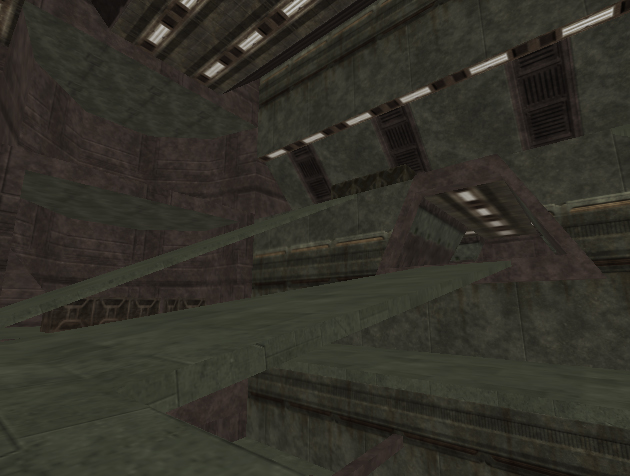 In order for this to work in unrealed you need to create a large (preferably) cube brush that overlaps the entire level. then just simply hit intersect which should grab the entire geometry of the level. After that you just export brush. Also for this to load properly you do need all the textures used in the map. You can easily batch export them all by running a command line to UCC.EXE in the system folder. e.g. UCC.EXE BATCHEXPORT Ancient.utx TEXTURE BMP C:\Unreal\Textures\Ancient and the source code below
Type T3dSurface

	Field brush,texture,tw,th
	Field texfile$,flags
	Field surface
	Field u.T3dVector,v.T3dVector
	Field n.T3dVector,o.T3dVector
	;I believe i remember reading unrealed polygons never have more than 16 vertices.
	Field vert.T3dVector[16]
	Field vcount
	Field panu#,panv#
End Type


Type T3dVector

	Field x#,y#,z#
	Field id

End Type


Type T3d2dCoord

	Field x#,y#

End Type

Function LoadT3dMesh(file$,ext$=".bmp")

	Local newmesh,tmpim
	Local fstream
	Local fline$

	Local mysurf.T3dSurface

	If file$ = "" Or ext$ = "" Then Return -1

	fstream = ReadFile(file$)

	newmesh = CreateMesh()

	While Not Eof(fstream)


		fline$ = ReadLine(fstream)
		If Instr(fline$,"Begin Polygon") <> 0 Then
			DebugLog "Found Polygon"
			mysurf = New T3dSurface
			mysurf\surface = CreateSurface(newmesh)

			If Instr(fline$, "Texture") <> 0 Then

				mysurf\texfile$ = gett3dval$(fline$,"Texture")
				If mysurf\texfile$ <> "" Then
					DebugLog extractdir$(file$)+mysurf\texfile$+ext$
					mysurf\texture = LoadTexture(extractdir$(file$)+mysurf\texfile$+ext$)
					tmpim = LoadImage(extractdir$(file$)+mysurf\texfile$+ext$)
					If tmpim <> 0 Then
						mysurf\tw = ImageWidth(tmpim)
						mysurf\th = ImageHeight(tmpim)
						FreeImage(tmpim)
						mysurf\brush = CreateBrush()
						BrushTexture(mysurf\brush,mysurf\texture)
					EndIf
				EndIf

			EndIf
			If Instr(fline$, "Flags") <> 0 Then

				mysurf\flags = gett3dval$(fline$,"Flags")

			EndIf

			buildt3dsurface(mysurf,newmesh,fstream)


		EndIf

	Wend

	;mesh is really big and rotated differently
	RotateEntity(newmesh,90,0,0)
	ScaleEntity(newmesh,0.5,0.5,0.5)

	CloseFile(fstream)

	Delete Each T3dVector
	Delete Each T3dSurface


End Function


Function buildt3dsurface(s.T3dSurface,mesh,fstream)


	Local fline$
	If s = Null Or mesh = 0 Or fstream = 0 Then Return -1

	While Instr(fline$,"End Polygon") = 0

		fline$ = ReadLine(fstream)

		If Instr(fline$, "Origin") <> 0 Then

			s\o = gett3dxyz(fline$,"Origin")


		EndIf
		If Instr(fline$, "Normal") <> 0 Then

			s\n = gett3dxyz(fline$,"Normal")

		EndIf

		If Instr(fline$, "TextureU") <> 0 Then

			s\u = gett3dxyz(fline$,"TextureU")

		EndIf

		If Instr(fline$, "TextureV") <> 0 Then

			s\v = gett3dxyz(fline$,"TextureV")

		EndIf

		If Instr(fline$, "Pan") <> 0 Then

			s\panu# = Float(gett3dval$(fline$,"U"))
			s\panv# = Float(gett3dval$(fline$,"V"))

			DebugLog "Pan vals U: "+s\panu#+" V: "+s\panv#

		EndIf

		If Instr(fline$, "Vertex") <> 0 Then

			s\vert[s\vcount] = gett3dxyz(fline$,"Vertex")
			s\vcount = s\vcount + 1

		EndIf


	Wend
	buildt3dpolygon(s,mesh)
	If s\brush <> 0 Then
		PaintSurface(s\surface,s\brush)
	EndIf


End Function


Function buildt3dpolygon(s.T3dSurface,mesh)

	If s = Null Or mesh = 0 Then Return -1

	Local uv.T3d2dCoord

	For i = 0 To s\vcount-1

		uv = GenUV(s,i)
		s\vert\id = AddVertex(s\surface,s\vert[i]\x#,s\vert[i]\y#,s\vert[i]\z#,uv\x#,uv\y#,1)
		Delete uv

	Next
	For i = 0 To s\vcount-3

	AddTriangle(s\surface,s\vert[0]\id,s\vert[i+1]\id,s\vert[i+2]\id)


	Next

End Function


Function DotProduct#(ax#,ay#,az#,bx#,by#,bz#)

	Return ((ax# * bx#) + (ay# * by#) + (az# * bz#))

End Function

Function GenUV.T3d2dCoord(s.T3dSurface,vindex)


	If s = Null Then Return Null

	If s\vert[vindex] = Null Then Return Null

	Local uv.T3d2dCoord = New T3d2dCoord

	uu# = DotProduct#(s\vert[vindex]\x#-s\o\x#,s\vert[vindex]\y#-s\o\y#,s\vert[vindex]\z#-s\o\z#,s\u\x#,s\u\y#,s\u\z#)
	vv# = DotProduct#(s\vert[vindex]\x#-s\o\x#,s\vert[vindex]\y#-s\o\y#,s\vert[vindex]\z#-s\o\z#,s\v\x#,s\v\y#,s\v\z#)
	uv\x# = (uu#+s\panu#)*(1.0/s\tw)
	uv\y# = (vv#+s\panv#)*(1.0/s\th)

	Return uv


End Function

Function gett3dxyz.T3dVector(fline$,item$)

	Local xyz.T3dVector
	Local tcoords$[3]
	Local nextone = 0

	fline$ = Replace(fline$,item$,"")
	fline$ = Replace(fline$," ","")
	For getpos = 1 To Len(fline$)

		tcoords[nextone] = tcoords[nextone] + Mid(fline$,getpos,1)
		If Mid(fline$,getpos,1) = "," Then
			tcoords[nextone] = Replace(tcoords[nextone],",","")
			nextone = nextone + 1
		EndIf
	Next

	xyz.T3dVector = New T3dVector

	xyz\x# = Float(tcoords[0])
	xyz\y# = Float(tcoords[1])
	xyz\z# = Float(tcoords[2])

	Return xyz

End Function

Function gett3dval$(fline$,item$)

	Local newval$,i
	Local offset = Instr(fline$, item$)+Len(item$)

	For i = offset To Len(fline$)

		newval$ = newval$ + Mid(fline$,i,1)
		If Mid(fline$,i,1) = " " Then
			newval$ = Replace(newval$,"=","")
			newval$ = Replace(newval$," ","")

			Return newval$
		EndIf
	Next
	Return newval$


End Function


Function extractdir$(filename$)

	If Len(filename$) = 0 Then Return filename$

	For i = Len(filename$) To 1 Step -1


		If Mid(filename$,i,1) = "\" Or Mid(filename$,i,1) = "/" Then


			Return Left(filename$,i)

		EndIf

	Next
	Return ""


End Function


;*******************************************************************************************************************
;DEMO
;*******************************************************************************************************************


Graphics3D 640,480,16,2

Global player=CreatePivot()
Global floorpivot=CreatePivot()
Global camera=CreateCamera(player)
Global campitch;,mvx,mvy,mvz

Text 0,0,"Loading map... please wait."
Flip
LoadT3dMesh("deck16.t3d",".BMP")
AmbientLight(200,200,200)

Repeat
Cls
freelook()
UpdateWorld()
RenderWorld()

Flip
Until KeyHit(1)
End


Function freelook()

	mxspd#=MouseXSpeed()*0.25
	myspd#=MouseYSpeed()*0.25


	MoveMouse GraphicsWidth()/2,GraphicsHeight()/2

	campitch=campitch+myspd
	If campitch<-85 Then campitch=-85
	If campitch>85 Then campitch=85
	RotateEntity player,campitch,EntityYaw(player)-mxspd,0

	If KeyDown(203) Then mvx=-2
	If KeyDown(205) Then mvx=+2
	If KeyDown(200) Then mvz=+2
	If KeyDown(208) Then mvz=-2

	If KeyDown(30) Then mvx=-2
	If KeyDown(32) Then mvx=+2
	If KeyDown(17) Then mvz=+2
	If KeyDown(31) Then mvz=-2


	MoveEntity player,mvx,0,mvz
	TranslateEntity player,0,mvy,0

End Function

;*******************************************************************************************************************
;*******************************************************************************************************************
[i]Last edited 2010 |
| ||
| I just got done exporting a t3d map from unrealed 3.0 looks as though the texture portion of it is really for the most part the only thing that changes to make it incompatible with what i have so far. Since unrealed 3 maps use multitexturing the texture spot refers to a material now instead of a texturefile. I have to look how UCC exports texture but if it creates a folder for the material and then dumps all the textures in there i could probably work with it, but i think the file name needs some sort of naming convention so i can set the right effects. Either case loading UT3 maps wouldn't look well unless you used xors3d or Fastex. |
| ||
| Looking good and keep going :) |
   |