Terrain Multiple Regions
BlitzMax Forums/MiniB3D Module/Terrain Multiple Regions
| ||
| Hello All, I have been playing with a terrain system *again*... I was able to create a 8x8 regions made up of 128x128 vertex each.. Below is the screenshot: 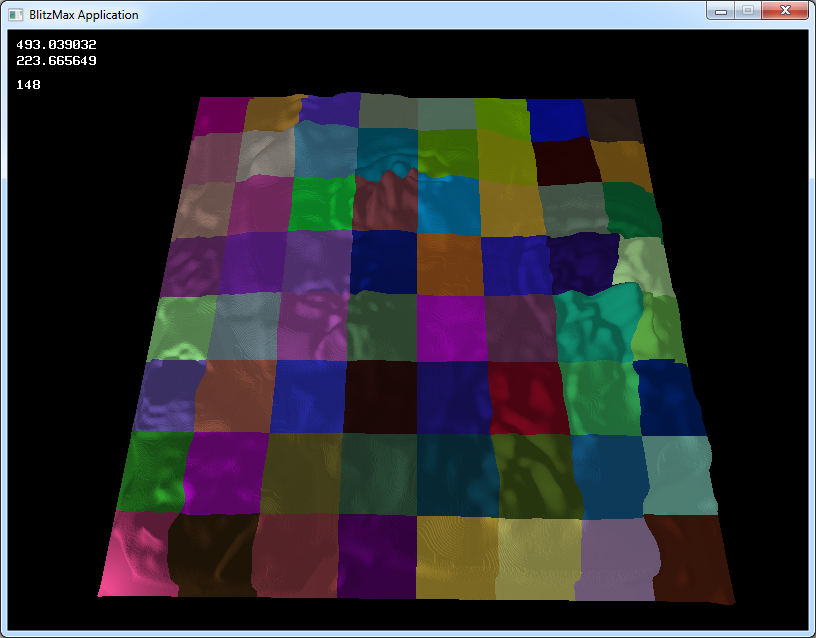 But my problem is that I need to know how to test to see if the regions sides are the same to keep the terrain aligned... This way I can use Vertex Blending and have multiple textures for the terrain blending.. here is my code:
Global Vert_Index:Int[99999999]
Global Vert_Count:Float
Global totalpixels:Float
Global img:TPixmap
Global HMap_Array:Int[9999,9999]
Global pix:Int

Global tex_grass:TTexture
Global blend:TTexture
Global tex_dirt:TTexture
Global blend2:TTexture
Global tex_mudd:TTexture

Global Tex_Brush:TBrush[6]

Type TTerrain Extends TMesh

	Field Mesh:TMesh[64,64]
	Field Region:TRegion[64,64]
	Field HMap:String

	Function Create:TTerrain (Width:Int, Height:Int, HMapF:String)

		Local w:Int = width
		Local h:Int = height

		If w > 32 Then w = 32
		If h > 32 Then h = 32

		Local tmp:TTerrain = New TTerrain

		tex_grass = LoadTexture("mudd.jpg")
		If Not tex_grass Then RuntimeError "grass.jpg not found!!"
		ScaleTexture tex_grass,32,32

		blend = LoadTexture("test2.jpg",4)
		If Not blend Then RuntimeError "test.jpg not found!!"
		ScaleTexture blend,1024,1024

		tex_dirt = LoadTexture("grass.jpg")
		If Not tex_dirt Then RuntimeError "mudd.jpg not found!!"
		ScaleTexture tex_dirt,16,16

		TextureBlend blend,3
		TextureBlend tex_grass,2

		If HMapF <> ""
			tmp.HMap = HMapF
			tmp.LoadHeightMap(HMapF)
		Else
			tmp.HMap = ""
		EndIf

		For Local tx:Int = 0 To (w - 1)  ; For Local tz:Int = 0 To (h - 1)

			tmp.Mesh[tx,tz] = CreateMesh()
			tmp.Region[tx,tz] = TRegion.Create(tmp.Mesh[tx,tz], tx, tz, tmp.HMap)
			For Local i:Int = 0 To 100
				'tmp.Region[tx,tz].SmoothTerrain:Float(0, tx, tz)
			Next
			EntityColor tmp.Mesh[tx,tz],Rand(255),Rand(255),Rand(255)
			'EntityFX tmp.Mesh[tx,tz],1
			UpdateNormals tmp.Mesh[tx,tz]

			'EntityTexture tmp.Mesh[tx,tz], tex_dirt,,1
			'EntityTexture tmp.Mesh[tx,tz], blend,,2
			'EntityTexture tmp.Mesh[tx,tz], tex_grass,,3

		Next ; Next

		Return tmp

	End Function

	Method LoadHeightMap:Int(file:String)

		img = LoadPixmap(file)

		For Local hx:Int = 0 To PixmapWidth(img)-1 ; For Local hz:Int = 0 To PixmapHeight(img)-1

			pix = ReadPixel(img, hx, hz)
			HMap_Array[hx,hz] = (pix Shr 16) & $ff

			totalpixels = PixmapWidth(img)*PixmapHeight(img)

		Next ; Next

		'DebugLog "Loaded: " + totalpixels

	End Method

End Type

Type TRegion Extends TSurface

	Field Surf:TSurface[4]
	Field Vert_Array:Int[128,128,4]
	Field SetHMap:Float

	Function Create:TRegion(mesh:TMesh, rx:Int, rz:Int, HMap:String)

		Local tmp:TRegion = New TRegion

		For Local ss:Int = 0 To 3

			tmp.Surf[ss] = CreateSurface(mesh)

			For Local vx:Int = 0 To 127  ; For Local vz:Int = 0 To 127

				'tmp.
				If HMap <> ""
					'For Local sx:Int = 1 To 127 ; For (z = 0;z < maxLength; z++)
					tmp.SetHMap = Float(HMap_Array[vx+(rx*127),vz+(rz*127)])/2
					'DebugLog tmp.SetHMap
				EndIf

				Local vi:Int = Vert_Count
				If ss = 0
					tmp.Vert_Array[vx,vz,ss] = AddVertex(tmp.Surf[ss], vx+(rx*127), -20+tmp.SetHMap, vz+(rz*127), vx+(rx*128), vz+(rz*128))
				EndIf
				'Vert_Index[vi] = tmp.Vert_Array[vx,vz,ss]
				Vert_Count:+1
				'If ss = 3
				'	VertexColor(tmp.Surf[ss], tmp.Vert_Array[vx,vz,ss], 255, 255, 255, 1)
				'Else
				'	VertexColor(tmp.Surf[ss], tmp.Vert_Array[vx,vz,ss], 255, 255, 255, 0)
				'EndIf

			Next ; Next

			For Local tx:Int = 0 To 126 ; For Local tz:Int = 0 To 126

				If ss = 0
					AddTriangle (tmp.Surf[ss], tmp.vert_array[tx+1,tz,ss], tmp.vert_array[tx,tz,ss], tmp.vert_array[tx,tz+1,ss])
					AddTriangle (tmp.Surf[ss], tmp.vert_array[tx+1,tz,ss], 	tmp.vert_array[tx,tz+1,ss], tmp.vert_array[tx+1,tz+1,ss])
				EndIf

			Next ; Next
		Next

		'DebugLog Int((Vert_Count / (totalpixels*4)) * 100) +"%"

		Return tmp

	End Function

	Function SmoothTerrain:Float(k:Float, w:Int, h:Int)

		For Local sx:Int = 1 To 127 ; For Local sz:Int  = 0 To 127

			HMap_Array[sx+(w*127),sz+(h*127)] = HMap_Array[(sx-1)+(w*127),sz+(h*127)] * (1-k) + HMap_Array[sx+(w*127),sz+(h*127)] * k;

		Next ; Next

		For Local sx:Int = 127-2 To 1 ; For Local sz:Int  = 0 To 127

			HMap_Array[sx+(w*127),sz+(h*127)] = HMap_Array[(sx+1)+(w*127),sz+(h*127)] * (1-k) + HMap_Array[sx+(w*127),sz+(h*127)] * k;

		Next	; Next

		For Local sx:Int = 0 To 127 ; For Local sz:Int  = 1 To 127

			HMap_Array[sx+(w*127),sz+(h*127)] = HMap_Array[sx+(w*127),(sz-1)+(h*127)] * (1-k) + HMap_Array[sx+(w*127),sz+(h*127)] * k;

		Next	; Next

		For Local sx:Int = 0 To 127 ; For Local sz:Int = 127-2 To 1

			HMap_Array[sx+(w*127),sz+(h*127)] = HMap_Array[sx+(w*127),(sz+1)+(h*127)] * (1-k) + HMap_Array[sx+(w*127),sz+(h*127)] * k;

		Next	; Next

	'For(x = maxWidth-2;x < -1; x--)
	   ' For (z = 0;z < maxLength; z++)
		'height[x,z] = height[x+1,z] * (1-k) +
			      'height[x,z] * k;


	End Function

End Type

Function CreateTerrain:TTerrain(tx:Int=1, tz:Int=1, file:String="")

	Return TTerrain.Create(tx,tz,file)

End Function
If you see something I need to change let me know, also I would like to add in LOD so I can render more vertexes per region.. also I don't have to worry about the issues with smoothing.. Thanks, FBEpyon (William McCollom) Last edited 2011 Last edited 2011 |
   |